Epype Account Billing
Your Account:
This is billing to pay for your monthly subscription.
Log In:
Log in to your account, click on Update Profile, then on Billing.
Now it's easy to track your payment since billing information is all in one place.
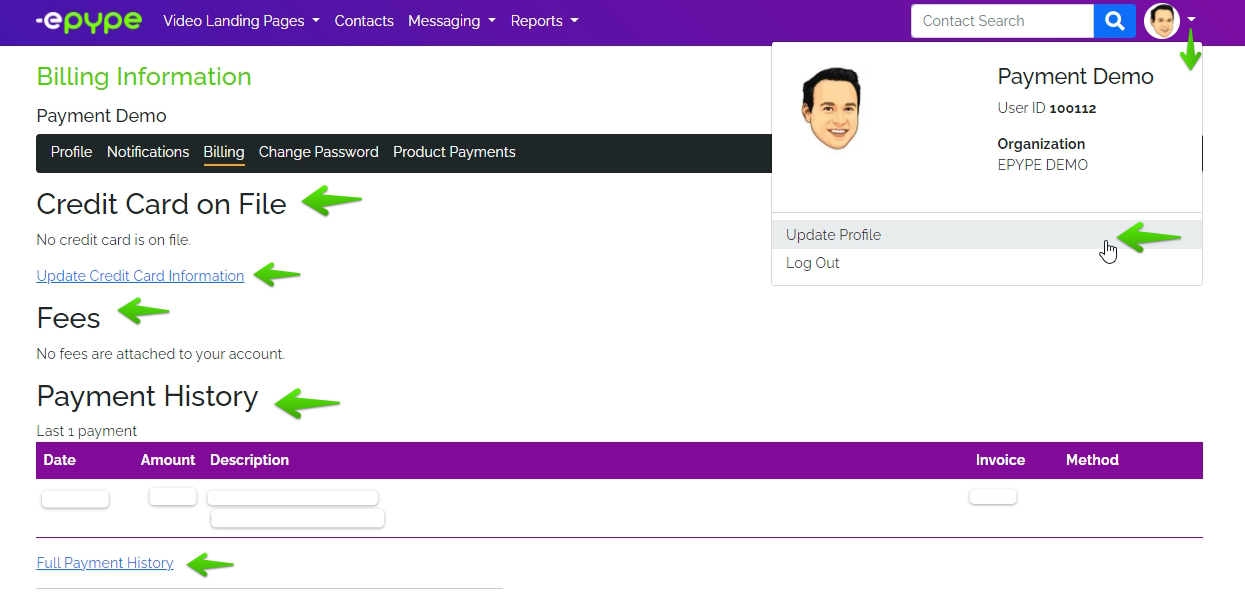
Under Billing you'll see:
Credit Card on File
- This is where you can see the card being used for your payment.
- An option to Update Credit Card Information is available.
Fees
- This is where you can see the fees attached to your account depending on the package selected when signing up.
Payment History
- This is where you can find your payment details.
- An option to view Full Payment History is also available.
Last Updated by: ES 03/14/2022